Blood Pressure App - SmartBP
evolvemedsysMedical
4.2350.00 Reviews
- Version
- 4.5
- Installs
- 1.00M
- Age Rating
- Everyone
Screenshots
Our Review of Blood Pressure App - SmartBP
 Analysis by Appyee
In a household, blood pressure tracking can quickly become a shared routine: one person takes a reading before breakfast, another needs to bring a record to an appointment, and someone else is trying to remember whether a medication was taken. I find SmartBP most useful when it helps turn those scattered moments into a record that can be reviewed later. It is a medical app from evolvemedsys, and its focus is practical: recording and organizing blood pressure information rather than replacing a monitor or a clinician.
That distinction matters if you are choosing an app for more than one person. A tracking tool can make it easier to notice patterns and prepare for a conversation with a healthcare professional, but the numbers still need to be measured with an appropriate device and understood in context. I would treat SmartBP as a personal logbook, not as a diagnostic service or a reason to change medication without medical advice.
One phone, several people: decide how to use it
A shared phone can sound convenient, especially when someone in the household is helping an older relative keep up with readings. The important question is whether each person can keep a clearly separate record in the way your household needs. I would check the app’s current account and profile options before putting several people’s information into one setup. If you cannot confidently tell whose reading is whose, a single shared log can become more confusing than a paper notebook.
For a household helper, a safer routine is to agree on who enters each reading and to add a clear note when a measurement needs context. For example, a caregiver could sit with a parent, confirm the reading belongs to them, and make sure it is recorded consistently. That kind of routine can help with organization, but it should not be mistaken for a dedicated family-management system.
Keep personal health records personal
Blood pressure readings are sensitive, so I would avoid treating a phone that everyone casually borrows as a private health record. Use the device’s own screen lock, be deliberate about who can open the app, and do not leave reports or the app open where another person might see them. Those are sensible precautions for any health log, especially when a device is used by children, guests, or other relatives.
SmartBP is rated for Everyone, but that age label does not mean every child should manage health information or medication reminders independently. For a younger user, an adult should guide the process and decide what information is appropriate to enter. For an older adult who finds phone menus difficult, the app’s straightforward layout may help, though a family member may still need to assist with setup and report sharing.
Make coordination useful, not overwhelming
A helpful household workflow is to settle on a consistent time and method for taking readings, then use the app to keep the resulting record organized. Notes can explain circumstances such as exercise or stress, while an exported report can give a clinician a compact view of the record. I would not ask relatives to interpret every change themselves; the value is in bringing a clearer history to an appointment and asking better questions.
Before sharing a report, check that it contains only the information you intend to send and that it is going to the right person. Emailing a file is convenient, but it also moves health information outside the app. If you are helping someone else, get their agreement before exporting or sending their readings. That small pause is a useful boundary, even in a close family.
What the household routine cannot solve
An app can remind someone to take a reading, but it cannot ensure the measurement itself is reliable or that a reminder is followed. A rushed reading, an incorrectly used monitor, or an entry assigned to the wrong person can undermine an otherwise tidy chart. I would keep the monitor’s instructions close at hand and use a consistent routine; if readings seem unusual or worrying, contact a healthcare professional rather than relying on the app to explain them.
There is also a trade-off between convenience and careful entry. Manual logging works with a wider range of monitors, but it asks the user to type the numbers correctly. Connecting a compatible monitor can reduce that effort, yet compatibility and setup matter, and a connection is only useful if it works reliably with the device you already own. I would test the workflow with a few readings before depending on it for an appointment.
Getting Started with SmartBP
First off, setting up SmartBP is a breeze. Seriously, it’s as simple as pie. You download it from your app store (available on both Android and iOS), and within minutes, you’re ready to roll. The interface is super intuitive, even for those who aren’t exactly tech-savvy.
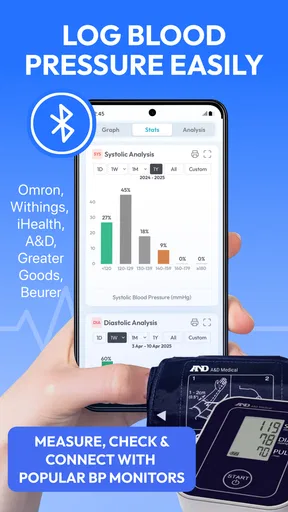
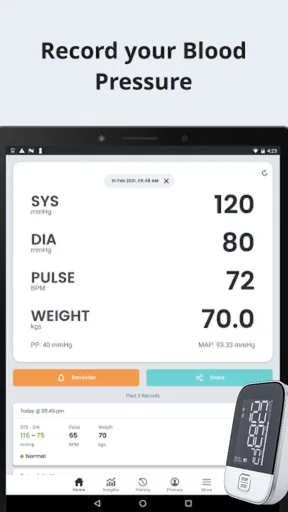
Once you’re in, you can start logging your blood pressure readings manually or connect it to a compatible blood pressure monitor. This synchronization feature is a godsend because it takes a lot of guesswork out of the equation. No more jotting down numbers on sticky notes that vanish into thin air!
Features that Keep You Hooked
What I love about SmartBP is the plethora of features that cater to different needs. Whether you’re monitoring your health for personal reasons or doctor’s orders, this app has got your back.
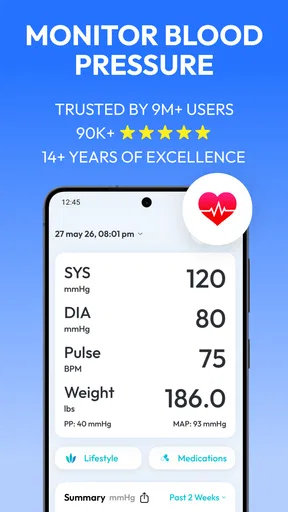
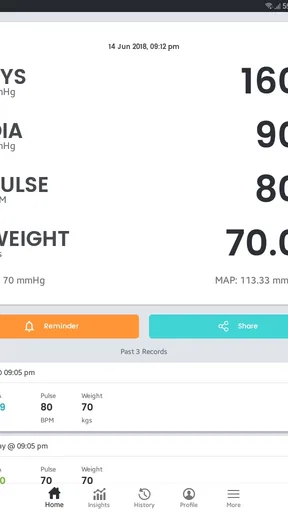
For starters, the app allows you to track your blood pressure over time. It not only records your systolic and diastolic pressures but also your pulse rate. You can visualize these stats through clear charts and graphs that make it easy to spot trends and patterns at a glance.
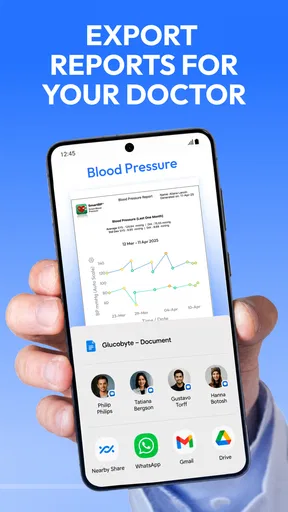
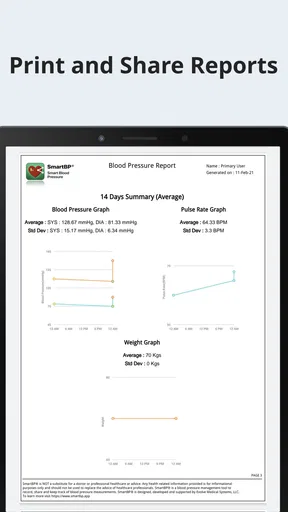
Now, if you’re someone who loves sharing your progress, SmartBP lets you export your data in PDF or CSV formats. This is perfect for keeping your doctor in the loop. You can even email these reports directly from the app. Talk about convenience!
Customization and User-Friendliness
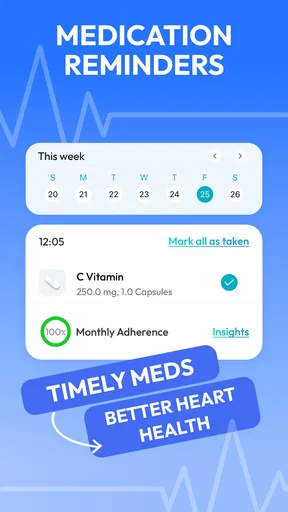
SmartBP truly stands out with its customization options. You can set reminders to take your medication or measure your blood pressure, which is a lifesaver for the forgetful folks among us. Plus, the app allows you to add notes to each reading—like if you were stressed or had just exercised—providing context that can be crucial for accurate health analysis.
The app’s user interface is clean and straightforward. You won't find any unnecessary clutter or confusing menus. Everything is designed to be user-friendly, which is a big relief if you want to focus on your health rather than figuring out tech stuff.
From daily entries to a useful appointment record
The most useful way I have found to approach a blood pressure log is to think beyond the individual number. A chart becomes more informative when readings are taken in a repeatable way and notes explain anything unusual about the day. If you measure after a brisk walk one morning and while seated and rested another, those entries may not be directly comparable. The app can organize the record, but a steady measurement habit is what makes that record easier to discuss.
For an appointment, I would export a report shortly beforehand rather than send every update as it happens. That gives me a chance to check the date range and make sure the document is relevant to the conversation. A CSV can be useful if someone specifically wants data in a spreadsheet, while a PDF is often easier to view as a finished report. The practical trade-off is that a neat export still needs a clinician’s interpretation; charts are helpful context, not a treatment plan.
Another small but worthwhile habit is to enter a reading soon after taking it. If you wait until the end of the day, it is easier to mix up values or forget whether a note belonged to the morning or evening. When helping another person, I would read the numbers back before saving them. That extra check takes little time and can prevent a typing error from becoming part of a trend line.
Choosing between SmartBP and simpler alternatives
Compared with writing numbers on paper, SmartBP can make trends easier to scan and reports easier to share. Paper still has an advantage when the user dislikes phones, wants no screen-based routine, or needs a simple backup beside the monitor. Compared with a monitor’s built-in memory, an app-based log may be more convenient for adding context and reviewing entries, while the monitor itself remains the tool that takes the measurement.
Some people may already use a general health platform to collect activity and other wellness information. SmartBP’s appeal is its more focused blood pressure record, with entries, notes, charts, reminders, and exports in one place. The trade-off is another app to maintain and another setup to learn. If you only take occasional readings and have no need to review or share a history, a basic notebook or your monitor’s own record may be enough. If you need an organized log over time, this dedicated approach is more useful.
The app is free to download, though it offers in-app purchases ranging from $5.49 to $89.99 per item. I would start by checking whether the free experience covers the workflow you actually need before paying for anything. The current version is 4.2.1, and it requires iOS 8.0 or later. Its 3.5 average from around 6,000 ratings suggests a mixed reception rather than universal satisfaction; I would pay attention to how well it fits your phone, monitor, and record-keeping habits instead of assuming it will suit every setup.
Where the app fits—and where it does not
SmartBP is a good fit for someone who takes readings regularly, wants to add context, and expects to review or share a history. It can also help a family member who supports another adult with routine record-keeping, as long as they first settle how to keep each person’s information distinct and private. Its reminders may be useful for building a habit, but they are prompts, not proof that a reading or medication was completed.
I would skip it if you want the phone to measure blood pressure by itself, need a clinician to monitor readings continuously, or are looking for emergency guidance. It is a tracker, not a cuff, a medical consultation, or an automated safety net. It may also be the wrong choice for someone who finds manual entry frustrating and does not own a compatible monitor, or for a household that cannot keep shared-device access and individual records clear.
SmartBP has been available since October 10, 2013, and has more than one million installs. Those figures show that it is an established option, but they do not remove the need to judge whether its logging style works for you. I see its strongest value in consistency: one place for readings, context, and a report that can make a medical conversation more productive.
Why SmartBP Could Be a Game Changer
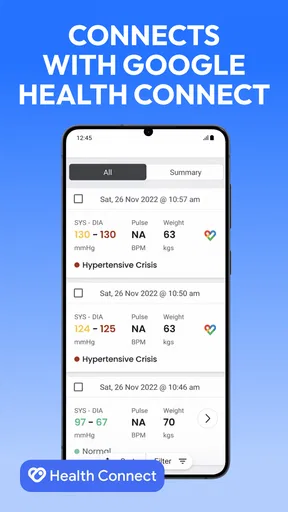
One of the major reasons I’m sold on SmartBP is its ability to make health management feel less daunting. By integrating seamlessly with other health apps and devices, it creates a comprehensive health ecosystem. You can sync it with Apple Health, Google Fit, and even integrate your fitness data if you’re wearing a smartwatch.
Furthermore, the app is constantly updated with new features and improvements. This means the developers are actively listening to user feedback and are committed to enhancing the app’s functionality. It's like having a personal health assistant that evolves with your needs.
Wrapping It Up
So, is SmartBP worth the download? Absolutely. Whether you’re trying to keep an eye on your blood pressure for health reasons or just interested in understanding your body better, this app is a solid choice. Its comprehensive features, ease of use, and customization options make it a standout in the sea of health apps available today.
So, if you’re ready to take control of your health journey, give SmartBP a whirl. It might just be the tool you didn’t know you needed!
Verdict
Strengths of Blood Pressure App - SmartBP
- User-friendly interface with intuitive navigation.
- Tracks historical data for easy monitoring.
- Syncs seamlessly with health apps.
- Customizable reminders for readings.
- Detailed analytics for better insights.
Limitations of Blood Pressure App - SmartBP
- Limited features in free version.
- Ads can be intrusive at times.
- Requires manual data entry.
- No direct doctor communication option.
- Occasional syncing delays reported.
Similar Picks in This Category
View All
WebMD: Symptom Checker
WebMD, LLC4.1

Microphone Amplifier
DOSA Apps4.2

Anatomy Learning - 3D Anatomy
3D Medical OU4.5

Period Tracker and Calendar
SimpleInnovation4.9

GoodRx: Prescription Coupons
GoodRx4.8

CVS Health
CVS Pharmacy4.5
Frequently Asked Questions
What features does the SmartBP app offer for blood pressure management?
SmartBP provides a comprehensive suite of features for managing your blood pressure. Users can log their readings, track historical data, and visualize trends through easy-to-read charts. The app also allows you to categorize readings by date and time, and synchronize data with other health apps for a more holistic view of your health.
Is SmartBP compatible with both Android and iOS devices?
Yes, SmartBP is available for both Android and iOS platforms. This ensures that users across different devices can utilize the app to manage their blood pressure effectively. The app offers seamless synchronization across devices, allowing you to maintain consistent health records regardless of your device preference.
How does SmartBP ensure data privacy and security?
SmartBP prioritizes user privacy and security by implementing robust data protection measures. The app uses encryption to safeguard sensitive health information, ensuring that your data is secure from unauthorized access. Additionally, users have control over their data sharing preferences, allowing them to decide which information is shared and with whom.
Can SmartBP integrate with other health and fitness apps?
Yes, SmartBP is designed to integrate with various health and fitness apps, such as Apple Health and Google Fit. This allows users to have a centralized view of their health metrics, facilitating better health management. The integration helps in compiling comprehensive health reports by combining data from different sources.
Are there any subscription fees or in-app purchases in SmartBP?
SmartBP offers both free and premium features. While the basic version is free and includes essential features for tracking blood pressure, there are in-app purchases available for users who desire advanced features. The premium version includes detailed analytics, custom reminders, and additional data storage, enhancing the overall user experience.
